Agents
An Agent, or LlmAgent, in Agent Development Kit (ADK) is a self-contained execution unit designed to act autonomously to achieve specific goals. Agents can perform tasks, interact with users, utilize external tools, and coordinate with other agents. The basic components of an Agent are an artificial intelligence (AI) model, task instructions, and optionally, a set of tools to be used by the agent. As agent tasks and complexity grow, you can use the ADK development framework to expand them into workflows, which allow you to combine and orchestrate multiple agents and code execution tasks.
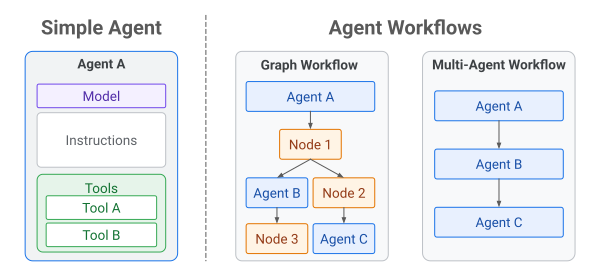
Figure 1. Simple Agents and Agent Workflows in ADK
Building an agent with just a model, instructions, and tools is a great place to start for most developers. As your agent grows in capability and complexity, you are likely to want to break up the capabilities of your agent application in order to better manage its behavior, work within model operating context limits, and modularize your code to keep it manageable. ADK agent Workflow architectures allow you to evolve an agent from a monolithic structure to more modular code and project structures.
Grow from single agent to workflows
In ADK, any agent application that has more than one agent or executable Node is considered a workflow. ADK does not impose any hard requirements to move from a single-agent architecture to a multi-agent or graph-based Workflow architecture. You can decide when to make that change based on the needs of your project, or as you discover limitations of a single-agent approach, such as:
- Instruction following performance: Beyond a certain length or complexity of a multiple step set of instructions, you may discover that a single agent does not reliably complete all instructions, or perform them with the required level of quality or speed.
- Context limitations: You may discover that the amount of data required to perform an agent task exceeds the context window limitations of the AI model you are using.
- Agent code modularity: As the complexity and organization of your agent code grows, you may want to break up the agent capabilities to make your code more manageable or enable re-use of agent code for other agent projects.
- Mixing deterministic and non-deterministic tasks: As you build agents for solving more complex problems, you may want to design and build agents that interweave the non-deterministic functionality of AI models with deterministic code, rather than relying on non-deterministic AI models to manage the full execution of a task. For more details, see Graph-based workflows.
For more information about ADK Workflows and agent project architectures, see the Workflows section.
Agent features
The capabilities of ADK agents can be extended and expanded using the following features:
-
AI models: Swap the underlying intelligence of your agents by integrating with generative AI models from Google and other providers.
-
Pre-built tools and integrations: Equip your agents with a wide array tools, plugins, and other integrations to interact with the world, including web sites, MCP tools, applications, databases, programming interfaces, and more.
-
Custom tools: Create your own, task-specific tools for solving specific problems with precision and control.
-
Artifacts: Enable agents to create and manage persistent outputs like files, code, or documents that exist beyond the conversation lifecycle.
-
Skills: Use prebuilt or custom Agent Skills to extend agent capabilities in a way that works efficiently inside AI context window limits.
-
Plugins: Integrate complex, pre-packaged behaviors and third-party services directly into your agent's workflow.
-
Callbacks: Hook into specific events during an agent's execution lifecycle to add logging, monitoring, or custom side-effects without altering core agent logic.
Next Steps
Now that you have an overview of the different agent types available in ADK, dive deeper into how they work and how to use them effectively:
- Simple agents: Explore how to configure agents powered by AI models, including setting instructions, providing tools, and enabling advanced features like planning and code execution.
- Graph workflows: Discover how evolve your agents from plain language instructions to composable, reliable execution paths that combine AI reasoning with deterministic code logic.
- Multi-agent workflows: Explore how to build agent applications that combine multiple agents, execution nodes, a variety of task execution control mechanisms to fit the needs of your project.